
MRZ : Machine-Readable Zone : une zone de lecture automatique, ou zone de lecture optique (est une zone, sur un document officiel, réservée à la lecture, à l’identification et à la validation de ce document.
Des documents tels que passeport, carte nationale d’identité , permis de conduire peuvent ou doivent comporter, selon les pays et selon les versions de documents, une zone de lecture optique.
La zone de lecture optique est normalisée par l’OACI (OACI/ICAO 9303).
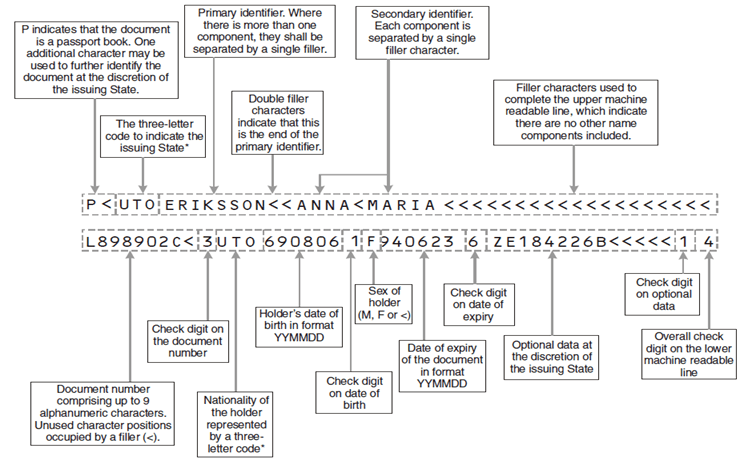
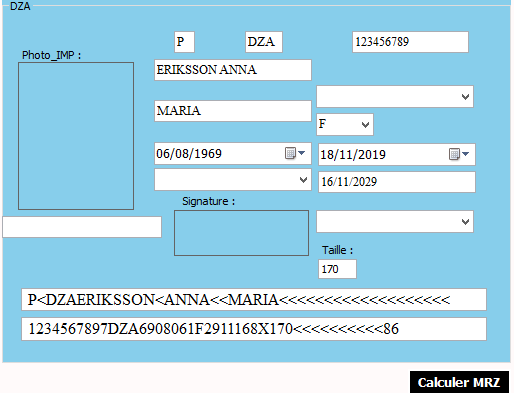
Calculer le chiffre de controle ( Check digit):
public static string CalculCC(string textcc)
         {
             string result = "";
             int valeur = 0;
             string text = textcc;
             int num1 = 0;
             int num3 = 0;
             int[] numArray = new int[3] { 7, 3, 1 };
             for (int index1 = 0; index1 < text.Length; ++index1)
             {
                 char ch = text[index1];

if ("0123456789ABCDEFGHIJKLMNOPQRSTUVYWXZ<".IndexOf(ch) == -1)
                throw new Exception((string)(object)ch + (object)" is an invalid character");
            // int num2 = (int)ch - 48;
            if (ch == '<')
            {
                valeur = 0;
            }
            else if (ch >= 'A' && ch <= 'Z')
            {
                valeur = (int)ch - 55;
            }
            else if (ch >= '0' && ch <= '9')
            {
                valeur = (int)ch - 48;
            }


            //for (int index2 = 0; index2 < numArray.Length; ++index2)
            //{
            //

            //}
            int index2;
            index2 = index1 % 3;

            num3 = numArray[index2] * valeur;
            num1 += num3;
            int sumt = num1 % 10;
            result = sumt.ToString();
        }

        return result.ToString();
    }
Calculer les deux lignes MRZ :
private void button1_Click(object sender, EventArgs e)
         {
             Font font = new Font("Times New Roman", 12f);
             mrz1.Font = font;
             mrz2.Font = font;
             string inputString = nom.Text;
             string outputString = inputString.Replace(' ', '<');
 string str = type.Text + "<" + code.Text + outputString + "<<" + prenom.Text;
        if (str.Length < 44)
        {
            int count = 44 - str.Length;
            mrz1.Text = str + new string('<', count);
        }

        string ccnpsp = CalculCC(npsp.Text);
        string naissDate = dateTimePicker1.Value.ToString("yyMMdd");
        string ccnaissdate = CalculCC(naissDate);
        string expDate = dateTimePicker2.Value.AddDays(3651.0).ToString("yyMMdd");
        string ccexpdate = CalculCC(expDate);
        string txtspecial = textBox1.Text;
        string cctxtspc = CalculCC(txtspecial);

        string npsp9 = CalculNpsp(npsp.Text);
        string mrztotal = npsp9 + ccnpsp + naissDate + ccnaissdate + comboBox2.SelectedItem + expDate + ccexpdate + "X" + textBox1.Text + "<<<<<<<<<<" + cctxtspc;
        string ccmrztotal = CalculCC(mrztotal);

        mrz2.Text = npsp9 + ccnpsp + "code.Text + naissDate + ccnaissdate + comboBox2.SelectedItem + expDate + ccexpdate + "X" + textBox1.Text + "<<<<<<<<<<" + cctxtspc + ccmrztotal;

    }

    public static string CalculNpsp(string npsp)
    {
        string result = npsp;
        int i = result.Length;
        if (result.Length < 9)
        {
            StringBuilder numberList = new StringBuilder();
            for (int j = 0; j < 9-i; j++)
            {

                numberList.Append("<");
            }
            result = result + numberList;
        }
        return result.ToString();
    }
 Bande MRZ